Screenwriting For Content Creators
YouTube - Watch this post's supporting video.
I used to make videos by waiting for an idea and then just hitting record. I remember sitting in my flat using tools ScreenFlow to whittle all my little clips into something resembling a video .
At a certain point, I realised that this technique wasn’t giving me the best results. I needed to start planning things out properly.
That meant I needed a writing process.
I was about to jump into Google Docs and start trying to fudge my own approach, but I thought “I might as well see how the professionals do it”.
So I did some research, went through some online courses, and learned the basics of screenwriting.
Today I’ll show you how the film and TV industry do things, before showing how to adapt and simplify this process to content creation for YouTube and TikTok.
Anatomy of a screenplay
All screenplays use a standardised document format that uses a handful of elements to tell a story.
* FADE IN / FADE OUT bookending the script
* Scene Headings (INT. and EXT.)
* Action lines in present tense
* Character introductions in ALL CAPS
* Dialogue blocks
* Parentheticals like (beat) and (muttering)
* Extensions - (O.S.), (V.O.), and (CONT'D)
* A transition with CUT TO:
* Props in ALL CAPS like COFFEE MUG
Sounds like a lot, but it’s not that hard really, and it keeps things familiar to everybody involved so they can focus on the content of your story. Something really handy to know is that the formatting is designed so that each page is about one minute of footage.
Here’s an example from HBO’s “The Pitt” (which I am currently watching — between my fingers!). Here we can see blocks of text styled depending on their purpose. Scene headings in all caps. Left-aligned, full-width paragraphs describing action. Dialogue indented and narrower than the action text. Within the paragraphs we see how capitalisation is used to introduce characters.

Continuing, we see the page number at the top right. Props are capitalised (”THE PHOTO”). We can also see our first dialogue paranthetical (”in Tagalog”) describing how the actor should deliver a line.

Here’s page 3. Dialogue, action. Here’s how you can spot a great screenplay - it has an economy of phrasing that tells the story and gives the actors everything they need to know, while creating tension that keeps you reading. “Unfortunately, Robby knows what this means”.

I find that reading a good screenplay is almost as good as watching the final production. This is really important when that final production costs millions of dollars to create!
But we’re not in a position to spend that kind of money, so how are things different for us lowly content creators?
Screenwriting ‘content’
If you’re just writing something for yourself, you probably don’t need to establish a lot of characters or indicate the tone of any particular line delivery. You already know, you wrote it.
Usually it’ll just be you, on camera, in one location.
But maybe you want to shoot different lines in different locations to support your story like Climate Town or MapMen.


You might need props.
You might need b-roll to show the steps of a process or provide some ambience and visual interest.
And you might want to add motion graphics or other illustrations.
With a script, you can plan all of this out ahead of time - it’s not limited to dialogue.
Screenwriting tools
You could just sit down with a typewriter. That’s how people used to do it, after all.

But things will be a lot easier with a piece of screenwriting software.
This software won’t only help you format your document, it also understands what the elements mean, so you can pull out a list of locations and props automatically.
Now you could do what I did and shell out $300 for Final Draft Pro, the industry standard tool “used by 95% of Hollywood”.
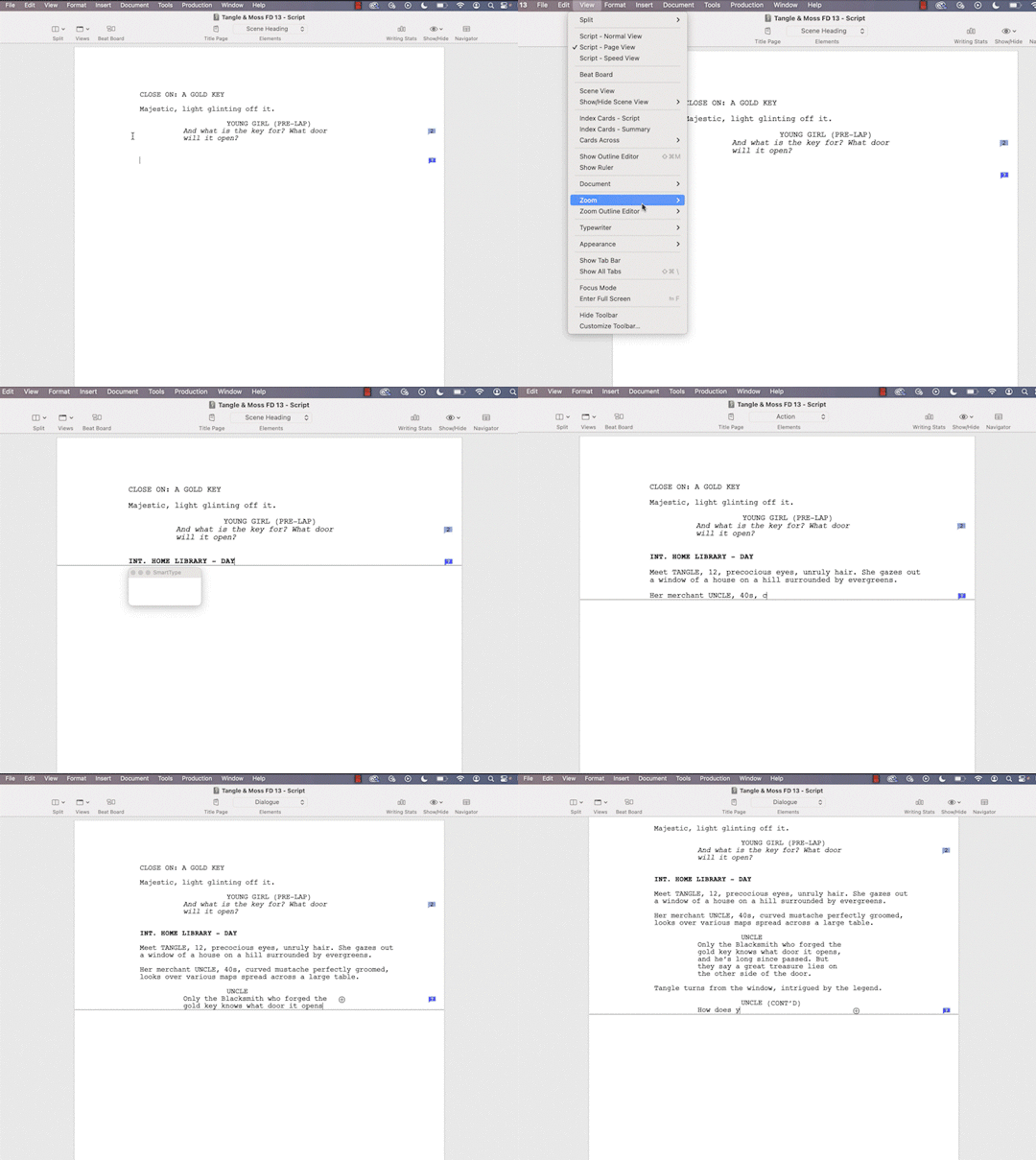
Or you could get (beat) which is free, open source, and often works better! https://www.beat-app.fi/
Using (beat)
Here’s (beat). When you start a line with INT. or EXT. it knows that’s a scene heading.

Then it will default to action if you just start typing.

You can press TAB to go into Dialogue.

It understands what you’re trying to do so you can focus on the script.

You can use Fountain format to add notes denoting any required props or costume changes. These notes will show in the sidebar and can be parsed by any bundled plugins. If (beat) doesn’t have the plugin you want, you can always drop the script in an LLM like Claude and ask it to make you a shopping list.
A note on graphics
I like to treat graphics and illustrations as their own ‘scenes’, so I’ll denote them GFX. SOMETHING SOMETHING INFOGRAPHIC. This feels like a legit use of the format to me.
Write. Rewrite.
So now you just have to sit down and write a script. How do you write something good? That’s beyond the scope of this post, but here are a couple of ideas I’ve found useful.

Dan Harmon’s Story Circle is a way to describe most interesting stories. We start with the status quo, then something causes a change, the protagonist adapts, struggles and overcomes their challenges before returning home, now changed.
When it comes to content, you are not the hero, your audience is. You are their guide. You help them on their quest like Obi Wan Kenobi.
Focus on two key elements: the desire and the struggle to meet that desire. What does your audience want, what is in their way, and how do they overcome it?
Writer’s block? There’s a simple solution: sit down and write something bad. Just prove to yourself what a bad writer you are. You’ll probably surprise yourself.
Write an entire draft in one session. Most videos don’t go on for hours, so this is achievable. You need to get into flow, immerse yourself in your story, and just get it all out, start to finish. Come back to it the next day and write a second draft. You’ll have had ideas and you’ll have been mentally editing. This is much harder to do with half a script. Personally I find it very difficult to get back into something half-finished and I often end up starting again instead.
Ideally you’ll write at least two or three drafts before you record anything. Sometimes you’ll write dozens. The end result will be infinitely better than if you just started recording stuff with no script.
Figure it out in the script. This will save you all manner of unnecessary prop purchases, train tickets and gear!
Production & Editing
As I mentioned, screenwriting tools are great for helping you organise your shoots. I love generating checklists that I can print out, put on a clipboard and work my way through on-location.
Since your scenes are all numbered, you can name your files clearly and get everything ready for editing.
If you take a look at squares.tv you’ll see a tool that turns a script into a Final Cut timeline, including captions. I’ve found this very useful for producing my own videos - I can drop in each bit of footage and immediately see what’s still missing.

Editless Video Production
What if I told you you might not need to do any video editing at all? What if you get it all in-camera, in one take?

That’s been my North Star for several years now. It’s the reason I started producing videos with live streaming software like OBS, Ecamm Live. It’s the reason I created tools like Beat Sheet and CueCam Presenter.
How CueCam 4.0 Does It
CueCam 4.0 has its own built-in script editing tool that feels very similar to Final Draft or Beat. Instead of scenes, they’re called cards. The “Action” blocks are for notes describing your media cues. Dialogue blocks are used for your teleprompter notes. They also contain titles (which you will often want to speak as well as display).

You can immerse yourself in your script or come back to a video preview, setting up the titles and media via the sidebar.

Of course, you can still do it with cue cards, but I’m looking forward to seeing how people adapt to the screenwriting process.

This is a really flexible way to work, because any card can show a trimmed video clip.
So if you wanted to play two different characters, you could script it all and record the second character’s lines in one go, split that performance onto the relevant cards, then record a run through where you play the main part, interacting with yourself.
More likely, you’ll want to bring in b-roll. You can collect all your different clips and bring them into the CueCam script as you go. Then just do a live run-through, showing each clip at the right moment and highlighting it with Video Pencil.
That’s how I do it anyway.
Learn Screenwriting
However you want to produce your videos, learning the tricks of the screenwriting trade is well worth it. The more you do it, the better you’ll get. Remember: at the end of the day, it’s all just
* ACTION [[What is going on?]]
and
* DIALOGUE [[What is being said?]]
There are loads of video courses out there, as well as books like John Truby’s “The Anatomy of Story” or “Save The Cat” by Blake Snyder.